
How Do You Create More Value From Google Ads Investment?
65% of businesses waste ad spend on irrelevant clicks. The root cause? Treating all keywords as equal when they're not. Learn how to solve your positioning challenges with this guide.
Matteo Arellano
7/28/202512 min read
In the following article we'll discuss the following points:
1. Why long-tail keywords convert 2.5x better (and where to find them)
2. The 9 keyword types that determine campaign success or failure
3. How negative keywords alone can improve ROAS by up to 40%
4. A step-by-step framework for building a keyword strategy that actually works
Let's get started.
Why Most Google Ads Campaigns Bleed Money on the Wrong Keywords
According to BlueTone Media, 65% of businesses waste ad spend due to irrelevant clicks in their PPC (Pay Per Click) campaigns. The primary culprit is not poor ad copy or weak landing pages, instead, it is a fundamental misunderstanding of search intent.
Consider the difference between these two searches: "what is CRM software" versus "CRM software for manufacturing teams pricing." The first is an educational query, which takes place when someone researches a concept. The second is a transactional query, which as the name implies occurs when someone is ready to buy.
Yet many advertisers bid on both identically, treating them as equivalent keywords.
This mistake compounds across thousands of keywords. Without a system for classifying search intent, identifying ambiguous terms, and building robust negative keyword lists, campaigns haemorrhage budget on clicks that will never convert.
After working extensively with Google Ads, including building campaigns, analyzing search term reports, and studying what separates profitable accounts from money pits — I have developed a framework that brings analytical rigor to keyword strategy. This guide shares that methodology so you can build campaigns that capture high-intent buyers while systematically eliminating wasteful spend.
Why This Approach Works: The Analytics Behind Intent
My background as a Finance Analytics Engineer at institutions like Cargill and the European Investment Bank taught me something crucial: the best decisions come from structured frameworks applied to clean data. When I transitioned into growth management and Google Ads, I brought that same analytical rigour.
The framework I will share is built on statistical patterns that appear consistently across industries. Research shows long-tail keywords convert at 36% on average compared to 11.45% for broad terms (Backlinko, 2024). Proper negative keyword management can improve ROAS — campaigns are digital marketing strategies designed to generate maximum revenue relative to the cost of advertising — by up to 40% (KeywordMe, 2025). And businesses that segment by search intent see dramatically different CPAs across their campaigns.
Whether you are managing a modest monthly budget or a substantial one, the principles remain identical. The scale changes; the methodology does not.
The Nine Keyword Types Every Advertiser Must Master
Google Ads campaigns fail for a consistent reason: advertisers treat all keywords as equivalent. They are not. Each keyword type serves a different purpose, attracts a different buyer stage, and requires a different bidding strategy. Understanding these distinctions is the foundation of profitable campaigns.
1. Educational (Informational) Search Queries
Educational queries represent users in research mode. They want to understand a concept, solve a problem, or learn how something works. Common patterns include questions starting with "what is," "how to," "why does," and "definition of."
Examples: "what is double-entry accounting," "how does machine learning work," "benefits of cloud ERP"
The Strategic Dilemma: These keywords typically have higher search volumes but lower conversion rates. Most advertisers either bid on them hoping for awareness (expensive) or ignore them entirely (missed opportunity). The data-driven approach is more nuanced.
Educational keywords become valuable when: you have a low-cost content asset (whitepaper, webinar) to capture leads at the top of funnel; your sales cycle is long and requires nurturing; or you can segment these users for remarketing. For direct-response campaigns with limited budgets, these should typically be excluded or bid down significantly.
2. Transactional Search Queries
Transactional queries signal buying intent. The user has moved past research and is ready to take action — whether that is making a purchase, requesting a quote, or booking a consultation. These are the keywords that drive revenue.
Examples: "buy accounting software," "CRM pricing plans," "hire data analyst contractor," "book financial consultation"
Key Indicators: Look for modifiers like "buy," "purchase," "pricing," "quote," "hire," "book," "near me," "for sale," and "discount." These signals indicate a user who has already decided they need a solution.
According to research by Semrush and Clearscope, transactional keywords trigger AI Overviews and featured snippets far less frequently than informational queries. This means your ads face less competition from organic results, making it into a significant advantage in 2025 and beyond.
3. Commercial Investigation Queries
Commercial queries occupy the middle ground. These are users that are close to buying but still comparing options. They want to make an informed decision before committing. These keywords often deliver excellent conversion rates because the user has intent but needs validation.
Examples: "best CRM for small business," "Salesforce vs HubSpot," "top accounting software 2025," "reviews of SAP Business One"
Common Modifiers: "best," "top," "vs," "versus," "comparison," "review," "alternatives to," "pros and cons"
These keywords require a specific strategy: your landing page must address the comparison directly. If someone searches "Xero vs QuickBooks" and clicks your ad, they expect a direct comparison — not a generic homepage.
4. Short-Tail vs Long-Tail Keywords
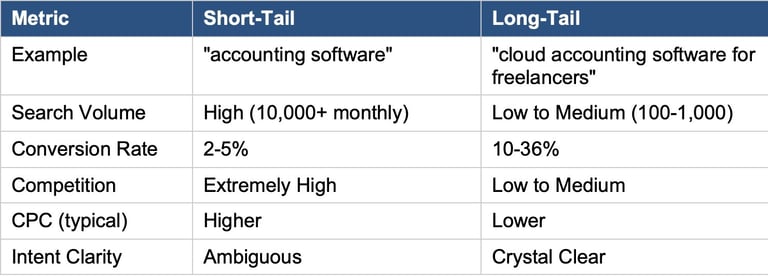
This distinction fundamentally changes campaign economics. Short-tail keywords (one to two words) cast a wide net with high volume and fierce competition. Long-tail keywords (three or more words) are specific, lower volume, but dramatically more profitable.
Short-Tail vs Long-Tail Comparison
According to Backlinko's analysis of 306 million keywords, 91.8% of all search queries are long-tail. This means most advertisers are fighting over just 8.2% of searches. The opportunity lies in the other 91.8%.
5. Branded and Navigational Queries
Branded queries include your company name, product names, or specific service offerings. Navigational queries indicate the user already knows where they want to go, they are using Google as a shortcut.
Examples: "Salesforce login," "HubSpot pricing," "[Your Company] contact"
Critical Strategic Decision: Should you bid on your own brand terms? The data suggests yes. According to Lunio, 93% of agencies run branded PPC campaigns for their clients. The reasoning: competitors are likely bidding on your brand name. By owning that real estate, you prevent leakage to rivals. Additionally, branded campaigns typically have extremely high Quality Scores (9-10), meaning very low CPCs and dominant SERP presence.
6. Competitor Keywords
Competitor bidding involves targeting searches for rival brand names, products, or solutions. This is legal, though you cannot use competitor trademarks in your ad copy.
Examples: "Xero alternatives," "SAP competitors," "[Competitor Name] pricing"
When Competitor Bidding Makes Sense: You have a clear competitive advantage to communicate. Your landing page directly addresses why users should switch. Your budget allows for potentially lower conversion rates (users were looking for someone else, after all).
When to Avoid: Your product is not as strong as the competitor. Your budget is limited (competitor terms typically convert at lower rates). You want to avoid potential retaliation.
Pro Tip: Research competitor pain points using Reddit, G2, and Capterra reviews. Build landing pages that specifically address those complaints.
7. Reputational Search Queries
Reputational queries occur when users search for opinions, reviews, or validation about your company or products. These are critical conversion-path touchpoints.
Examples: "[Company] reviews," "is [Product] worth it," "[Company] complaints," "[Product] vs competitors"
These queries indicate a user close to conversion who needs final validation. Owning this real estate — either through ads or organic content — ensures you control the narrative rather than leaving it to third-party review sites.
Also it is crucial to own your negative reviews by either:
Answering potential complaints on Google Reviews, Reddit or Forums through either acknowledgement of the issue or solving it for that affected customer;
Being present and transparent in what the business is currently working on to improve its own product, service or customer relationships.
This shows that the company takes responsibility and limits the negative impact of bad user experiences.
8. Negative Keywords: The Budget Protectors
Negative keywords prevent your ads from appearing for irrelevant searches.
They are not a type of search query, instead, they are your defence mechanism against wasted spend. According to BlueTone Media, 65% of businesses waste ad spend due to irrelevant clicks. That means, the business name appears when the user had no issue of buying your product at all.
Suggested Negative Keywords to Add for Your Business:
• free, freeware, open source, gratis
• cheap, budget, discount, affordable, low-cost
• jobs, careers, hiring, employment, salary, indeed
• DIY, how to, tutorial, course, training, certification
• download, PDF, etc.
• example, sample, template, definition
Industry-Specific Negatives:
As a general rule of thumb, SaaS companies should block "open source" and "self-hosted." Premium brands should block "cheap" and "used." Service providers should block "DIY" and "free tool."
9. Ambiguous Keywords: The Hidden Danger
Ambiguous keywords have multiple possible interpretations.
The classic example: "Apple" could mean the fruit or the technology company. Less obvious examples create significant waste in B2B advertising.
Examples: "Python" (snake vs programming), "Cloud" (weather vs computing), "Java" (island vs programming), "Mercury" (planet vs element vs car)
How to Identify Ambiguous Keywords:
1. Search the term in Google and analyze the SERP. If results mix different intents, the keyword is ambiguous.
2. Check your Search Terms Report for irrelevant queries triggering your ads. Navigate to Keywords > Search Terms in Google Ads. Look for:
Mismatched intent: Your keyword is "Python training" but you see searches like "python snake care" or "python pet food"
Wrong industry: You sell B2B software but see searches containing "free," "student," "personal use," or "home"
Wrong geography: Searches mentioning locations you don't serve
Job seekers: Queries containing "jobs," "salary," "career," "hiring," or "indeed"
Research-only intent: Queries with "what is," "definition," "examples," "PDF," or "case study" when you want buyers, not researchers.
Sort by cost (highest first) to find where you're bleeding the most money on irrelevant clicks.
3. Use Google Keyword Planner to see related terms — if they span different topics, you have an ambiguity problem.
Solution: Add qualifying terms to create specificity. Instead of "Python," use "Python programming" or "Python developer." Instead of "Cloud," use "Cloud computing" or "Cloud ERP."
The Keyword Strategy Framework: A Step-by-Step System
Now that you understand the nine keyword types, here is a framework for building high-converting keyword strategies.
Step 1: Build Your Transactional Keyword Foundation
Start with high-intent transactional keywords — these are your revenue drivers. Use Google Keyword Planner to identify terms with clear purchase intent.
Process:
1. Enter your core product or service into Keyword Planner
2. Filter for keywords containing: buy, purchase, pricing, quote, hire, book, order, subscription
3. Export to spreadsheet and add columns for: Search Volume, CPC, Competition Level, Intent Classification
4. Calculate Estimated CPA (Cost Per Acquisition): Total Cost of Conversions ÷ Total Number of Conversions.
Example:
Keyword CPC: €4.00
Expected Conversion Rate: 5% (0.05)
Estimated CPA = €4.00 ÷ 0.05 = €80 per acquisition
If your target CPA is €100 (based on your margins and customer value), this keyword is viable. If your target CPA is €50, this keyword is too expensive.
Note: Start with a 3-5% conversion rate assumption for transactional keywords. Adjust based on your actual data once campaigns run. You can also analyze conversion rates based on benchmarks or intelligence tools. We can help you with that too.
5. Prioritize keywords where Estimated CPA < Your Target CPA
Step 2: Reverse-Engineer Competitor Keywords
Your competitors have already done keyword research. Use their work to expand your list and identify gaps.
Tools: At Foresight Fintelligence, we have in-house tools that provide competitor analysis. SEMrush Advertising Research, Ahrefs Site Explorer, SpyFu, Google Ads Auction Insights are also well-known options.
What to Look For:
Keywords competitors bid on consistently (they likely have proven ROI). Especially look for keywords where competitors have been advertising for 6+ months. Consistent spend suggests proven ROI; they wouldn't keep paying if it wasn't working.
Gaps where competitors do not advertise: These are keywords with decent search volume and clear intent where no one is bidding aggressively. They're your low-competition goldmines.
How to find gaps:
Our internal foresight fintelligence SEO tool: Enter your domain alongside 2-3 competitors. Filter for keywords where competitors rank organically but don't run ads, they've validated the keyword has value, but left paid search wide open.
Google Keyword Planner: Look for keywords marked "Low" competition with reasonable search volume. Cross-reference with a Google search — if you see few or no ads, it's a gap.
Manual SERP check: Search your target keywords at different times of day. If you consistently see only 1-2 ads (or none), competitors haven't prioritized that term.
Example gaps to look for:
Long-tail variations competitors ignore: They bid on "CRM software" but not "CRM software for consulting firms"
Adjacent problems: They advertise their solution but not the problem keywords ("automate invoice processing" vs "invoice errors costing money")
Regional terms: Competitors target "accounting software UK" but neglect "accounting software Manchester" or "accounting software for UK contractors"
Landing pages they use for specific keywords (reverse-engineer their funnel):
Landing pages they use for specific keywords — Understanding where competitors send their paid traffic reveals their conversion strategy and what they believe works.
How to analyse:
Click their ads: Search for keywords in your space and click competitor ads (use incognito mode). Note where they send you — homepage? Dedicated landing page? Product page? Pricing page?
Intelligence tools: These can show the destination URL for each paid keyword. Look for patterns in how they match keywords to pages.
Save and compare: Screenshot competitor landing pages. Document their structure, headline, CTA, form length, and offer.
What to look for:
Page specificity: Do they send "CRM software pricing" to a pricing page, or dump everything on the homepage? Specific pages usually mean they've tested and optimized.
CTA type: Are they pushing free trials, demos, consultations, or downloads? This tells you what converts in your market.
Form length: Short forms (name + email) suggest top-of-funnel lead capture. Longer forms (company size, budget, timeline) indicate they're qualifying harder for sales-ready leads.
Social proof placement: Where do they show testimonials, logos, case studies? What objections are they addressing?
Reverse-engineer insight: If a competitor sends their "enterprise" keywords to a page with a "Book a Demo" CTA and 6-field form, but sends "small business" keywords to a page with "Start Free Trial" and a 2-field form — they're segmenting by buyer type. Consider whether you should do the same.
Ad copy patterns (what messaging resonates in your market):
Ad copy patterns: Analyizing competitor ads reveals what language, offers, and emotional triggers have been tested in your market. You don't need to copy — but you should understand what's working.
How to analyze:
Google Ads Transparency Center (ads.google.com/transparency): Search any advertiser's name to see all ads they're currently running across Google. Free and comprehensive.
Meta Ad Library (facebook.com/ads/library): If competitors also run Meta ads, their messaging themes often carry over to Google.
Foresight Fintelligence Tools: We can show historical ads for any domain — useful for seeing what messaging they've kept (likely working) vs. dropped (likely underperforming).
What to look for:
Headlines: What benefit do they lead with? Speed? Price? Results? Trust?
Proof points: Do they use specific numbers ("Save 10 hours/week," "500+ companies trust us," "93% customer satisfaction")?
Differentiators: What do they claim that others don't? "No setup fees," "24/7 support," "Built for [specific industry]"
Offers: Free trial? Demo? Discount? Audit? What's the hook to get the click?
Urgency/scarcity: Do they use time-limited language ("This month only," "Limited spots")?
Pattern analysis example:
If you notice 4 out of 5 competitors lead with price-focused messaging ("Affordable," "Low-cost," "Save money"), you have two strategic choices:
Compete on price — if you can genuinely beat them
Differentiate on value — lead with quality, results, or expertise ("Premium service," "Trusted by [industry leaders]," "Done-for-you solution")
Option 2 often attracts higher-quality leads willing to pay more.
Step 3: Assess Volume vs Value (The Critical Trade-off)
This is where most advertisers go wrong. They chase volume without considering value.
The Framework:
• High Volume + High Value = Bid aggressively (these are rare)
• High Volume + Low Value = Avoid or bid low (expensive with poor returns)
• Low Volume + High Value = Bid strategically (your hidden gems)
• Low Volume + Low Value = Ignore
How to Determine Value: Value is determined by conversion rate and customer lifetime value, not search volume. A keyword with 100 monthly searches that converts at 15% is worth far more than a keyword with 10,000 searches that converts at 0.5%.
Calculate Keyword Value: Estimated Revenue = Search Volume × CTR × Conversion Rate × Customer Value.
Compare this against estimated cost (Search Volume × CTR × CPC) to determine profitability before spending.
Let's take an example:
You're considering the keyword "financial reporting automation software pricing"
Search Volume: 200/month
Expected CTR: 5% (10 clicks/month)
Conversion Rate: 8% (0.8 conversions/month)
Average Customer Value: €5,000
Estimated Monthly Revenue = 200 × 0.05 × 0.08 × €5,000 = €4,000
Now compare against estimated cost: Estimated Cost = Search Volume × CTR × CPC = 200 × 0.05 × €3.50 = €35/month
This keyword has strong profit potential: €4,000 revenue vs €35 cost.
Contrast with a short-tail keyword: "accounting software"
Search Volume: 50,000/month
Expected CTR: 2% (1,000 clicks/month)
Conversion Rate: 0.5% (5 conversions/month)
Average Customer Value: €5,000
Estimated Monthly Revenue = 50,000 × 0.02 × 0.005 × €5,000 = €25,000 Estimated Cost = 50,000 × 0.02 × €12 = €12,000/month
Higher revenue, but the margins are razor-thin and the risk is far greater.
Step 4: Build Your Negative Keyword List
Before launching any campaign, establish your negative keyword foundation. This prevents wasted spend from day one.
Three-Tier Approach:
• Account-Level Negatives: Universal blockers (free, jobs, DIY, cheap) applied across all campaigns
• Campaign-Level Negatives: Industry-specific terms that are irrelevant to specific campaign goals
• Ad Group-Level Negatives: Highly specific exclusions for precise control
Review Cadence: Check your Search Terms Report weekly (or bi-weekly for smaller accounts). Add any irrelevant queries as negatives immediately.
Step 5: Segment Campaigns by Intent
Never mix intent types in the same campaign. This is crucial for optimization and budget allocation.
Recommended Campaign Structure:
• Brand Campaign: Your company name, product names (highest priority, lowest CPC)
• Competitor Campaign: Competitor brand terms (separate budget, lower expected conversion rate)
• Transactional Campaign: High-intent purchase keywords (primary revenue driver)
• Commercial Investigation Campaign: Comparison and review keywords (mid-funnel)
• Educational Campaign (Optional): Informational keywords for awareness (lowest priority unless you have content assets)
Implementation Reality Check
Implementing this framework properly requires honest assessment of your resources and capabilities.
Time Investment: Initial keyword research and account structure: 8-15 hours. Weekly optimisation (Search Terms Review, bid adjustments): 2-4 hours. Monthly strategic review: 3-5 hours.
Tool Requirements:
Google Keyword Planner (free with Google Ads account).
Competitor research tool (you can use those out there on the market or contact us for custom intelligence implementation, it's API ).
Spreadsheet software for analysis (such as Excel)
Common Pitfalls to Avoid:
• Starting with broad match keywords without sufficient negative keyword coverage
• Enabling Smart Bidding before accumulating 30+ conversions (the algorithm needs data)
• Neglecting the Search Terms Report (your primary source of optimization insights)
• Mixing intent types in single campaigns (destroys your ability to optimize effectively)
When to Get Help: If your ad spend is significant and you do not have dedicated resources for optimization, the efficiency gains from professional management typically exceed the cost. Similarly, if you are launching in a highly competitive market or multiple geographies, experienced guidance prevents expensive learning curves.
Transform Your Google Ads Performance
The difference between profitable Google Ads campaigns and money pits comes down to understanding search intent and applying systematic frameworks. Most advertisers treat keywords as interchangeable commodities. The framework I have shared treats them as distinct assets with different purposes, costs, and returns.
Start by auditing your current campaigns against these principles.
How much of your spend goes to educational queries that never convert?
Do you have a robust negative keyword strategy?
Are you competing for generic short-tail terms when long-tail transactional keywords offer better economics?
If you are dealing with a Google Ads account that feels like a black box — spending money but unclear on whether it is delivering real value — I can help you apply this framework to your specific situation. Whether you need an audit, campaign restructuring, or ongoing optimization, let us discuss what makes sense for your business.
Visit foresightfintelligence.com to schedule a consultation, or connect with me on LinkedIn to continue the conversation.


Services
Strategic Data, Analytics and Automation solutions offered.
Growth
Finance
matteo.aurelio@foresightfintelligence.com
Contact e-mail:
© 2025. All rights reserved. Privacy Policy